🎯 Chrome Extension for LinkedIn

Know your match score before you apply

Upload your resume once. Every LinkedIn job you view instantly shows your match score, salary estimate, gap coaching, ATS keyword check, cover letter, and interview prep - without leaving the page. No tab-switching. No web apps. Everything inside LinkedIn.

Add to Chrome - Free See live demo → See how it works ↓

No middleman between you and OpenAI. Your data never touches our servers. · Don't have an API key? 2-min setup guide →

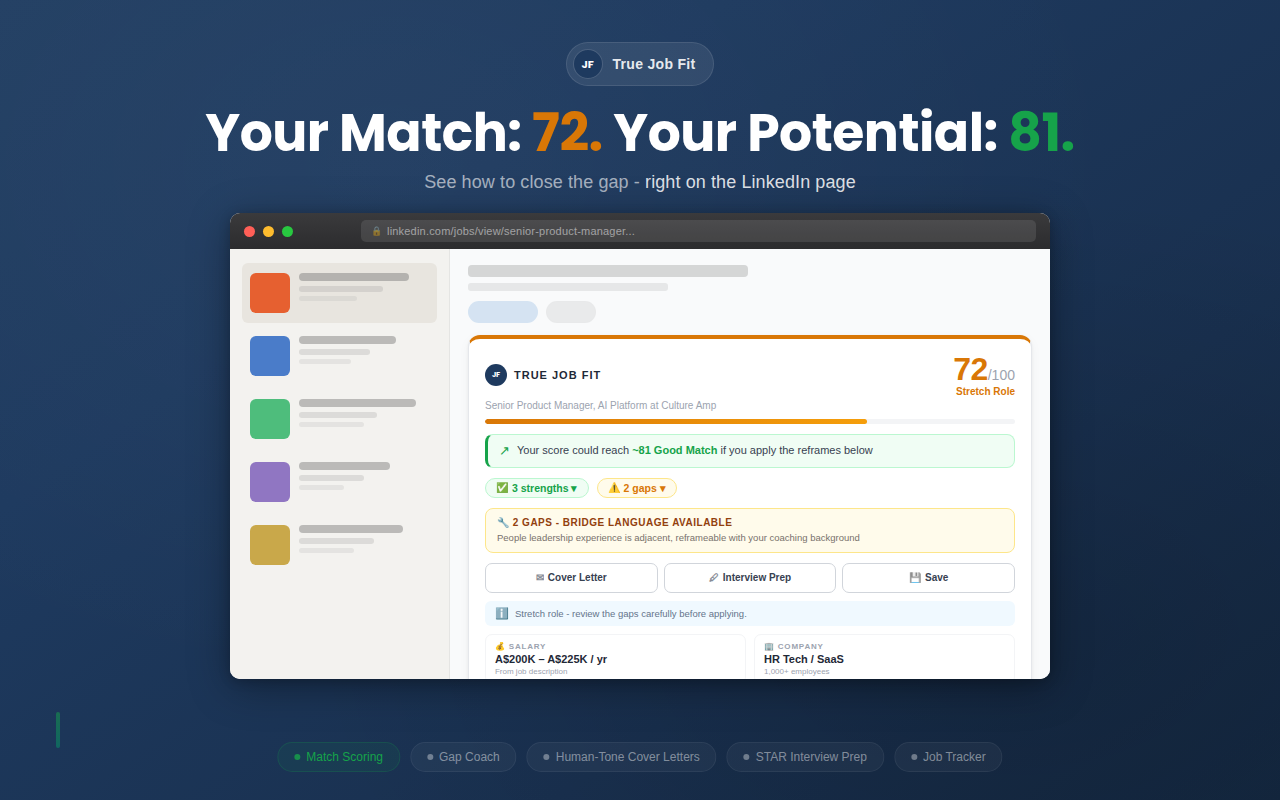
True Job Fit match scoring panel on LinkedIn showing a 72/100 score with potential score, gap coaching and action buttons

Other tools make you switch tabs and paste job descriptions. True Job Fit shows everything on the LinkedIn page you're already looking at.

v2.7.0Updated March 2026 · See what's new

Three steps. Under a minute.

1

Upload your resume

Drop in your PDF or DOCX. It's parsed locally in your browser and structured by AI. Done once - works for every job.

Supports PDF + DOCX · Parsed client-side
2

Add your API key

Paste your OpenAI API key. It stays on your device - we never see it. Typical cost: a few cents per day.

~$0.02 per scan · ~$0.15 full prep · ~$4/month active use
3

Browse LinkedIn

Every job page now shows your match score, strengths, gaps, salary estimate, and one-click tools - automatically.

Works on all LinkedIn job pages

Everything you need, nothing you don't

🎯

Calibrated Match Score

Not just keyword matching. The scoring system classifies role type, function match, and seniority alignment - then applies hard ceilings so adjacent experience doesn't inflate your score. Appears directly on the LinkedIn job page. No tab-switching, no copy-pasting into another app.

🔑

Gap Coach with Bridge Language

98% of Fortune 500 companies use ATS to filter applications before a human sees them. Most rejections aren't about missing skills - they're about missing words. The Gap Coach shows which terms to adopt and gives you bridge language to reframe your experience in the job's own words.

🔍

ATS Keyword Check

See exactly which keywords from the job description are on your CV, which ones you have but described differently, and which are genuine gaps. Every keyword comes with a specific action: swap a word, weave a term into an existing bullet, or add to your skills section. No other tool tells you what to change and where.

✉️

One-Click Cover Letters

Four distinct styles (Strategic, Technical, Results-led, Balanced), three lengths. Tailored to the job, your resume, and the market. Copy, edit, download - without leaving LinkedIn.

🎤

Interview Prep From Your Resume

Not generic questions - every answer framework is built from your actual experience. STAR stories reference your real projects and numbers. Regenerate any question for a fresh angle. Download the whole round as markdown to review on your phone before the interview.

📊

Application Dashboard

Track every job from Saved → Applied → Interviewing → Offered. Score distribution map, filtering, sorting, notes, and links to your cover letters and interview prep.

🔒

No Middleman With Your Data

Your API key, tracked jobs, and analysis results stay in your browser — never sent to any server we control. When you run an analysis, your resume and the job description go directly to OpenAI using your own key. No True Job Fit servers in between.

From "Should I apply?" to "I'm ready for the interview"

Score

See your match instantly

Browse any LinkedIn job and your score appears automatically - calibrated to distinguish between direct experience, adjacent skills, and genuine gaps. No copy-pasting into ChatGPT.

85/100 Strong Match - direct function, aligned seniority
True Job Fit match scoring
Gap Coach

Close the gaps without new skills

98% of Fortune 500 companies use ATS to filter applications (Jobscan, 2025). Most candidates who get filtered out aren't missing skills - they're missing words. The Gap Coach shows exactly which JD keywords your resume is missing and gives you bridge language to reframe what you already have.
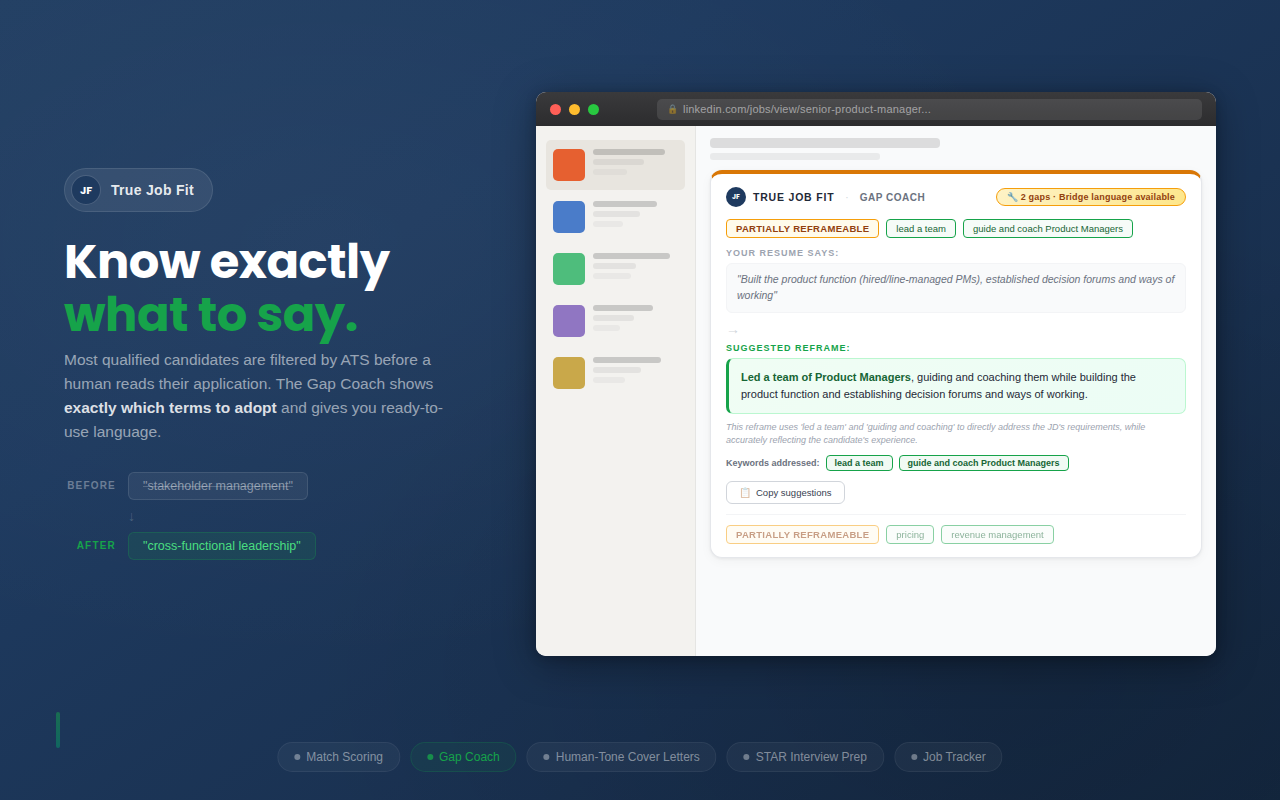
Your resume says "stakeholder management" JD wants "cross-functional leadership"
Your score could reach ~89 if you apply the reframes below
True Job Fit gap coach with bridge language
ATS Keywords

Know exactly which keywords to add, and where

The ATS Keyword Check extracts every important keyword from the job description and checks it against your CV. For each keyword you have but described differently, it tells you the specific bullet to edit and the exact word to change. For genuine gaps, it tells you to prepare for interview questions instead of faking it.
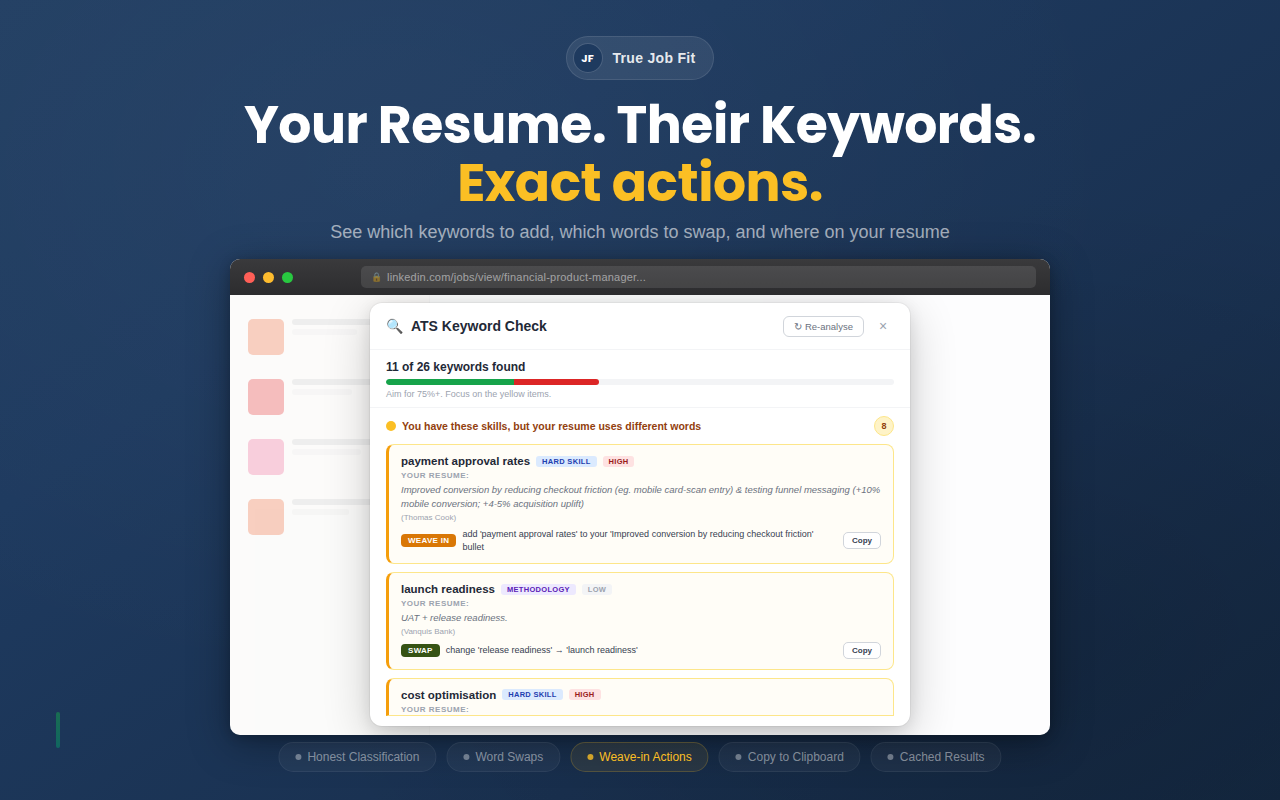
Your CV says "member journey" SWAP: change to "consumer journey"
Missing "channel performance" WEAVE IN: add to your "CVR 0.74% → 5.07%" bullet
True Job Fit ATS Keyword Check showing word swaps and weave-in actions on LinkedIn
Cover Letter

Generate a tailored letter in one click

Four distinct styles - Strategic, Technical, Results-led, Balanced. Three lengths. Tuned to avoid AI tells. Uses your gap coach reframes so the letter speaks the job's language.
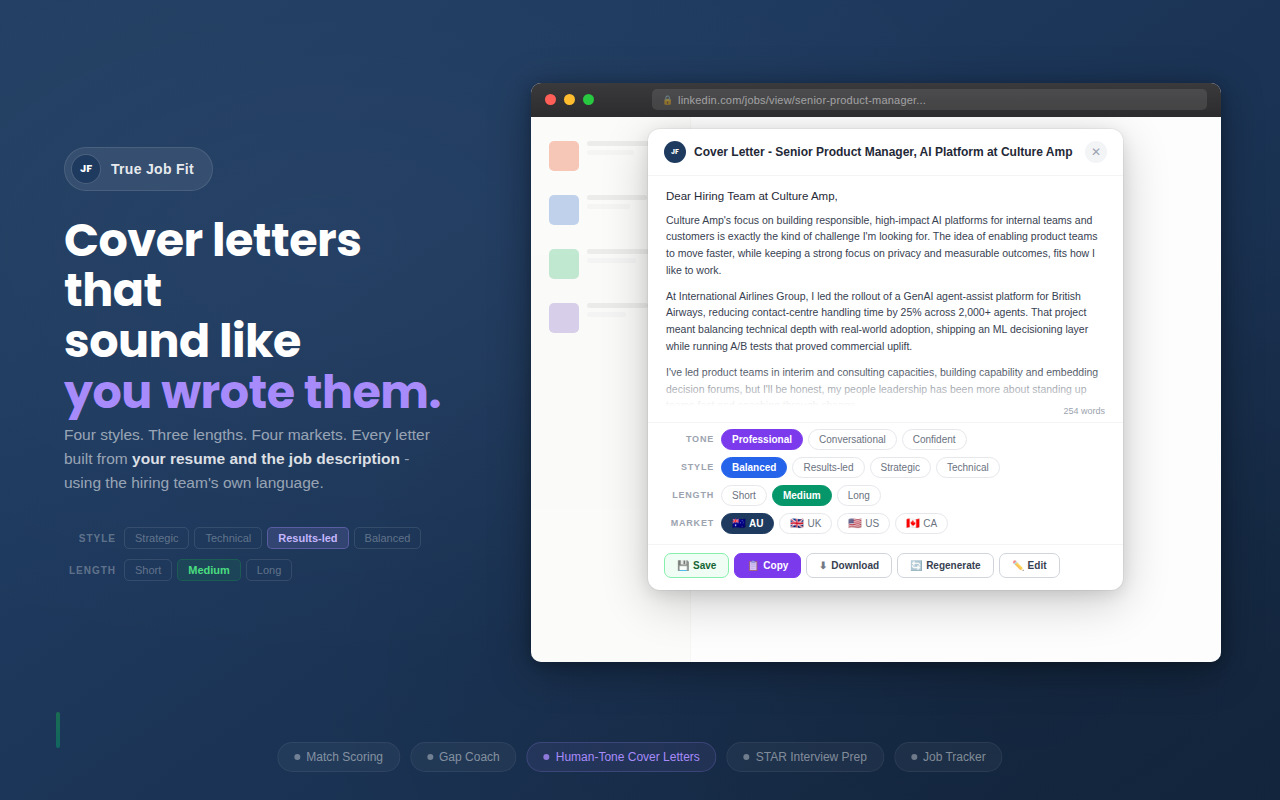
Strategic Technical Results-led Balanced · Short · Medium · Long
True Job Fit cover letter generator
Interview Prep

Answers written from your experience, not generic templates

Every answer framework pulls directly from your resume. When it suggests how to answer "Tell me about scaling a platform," it references your actual project, your actual numbers, your actual role - wrapped in STAR format so you walk in with structured stories, not vague talking points.
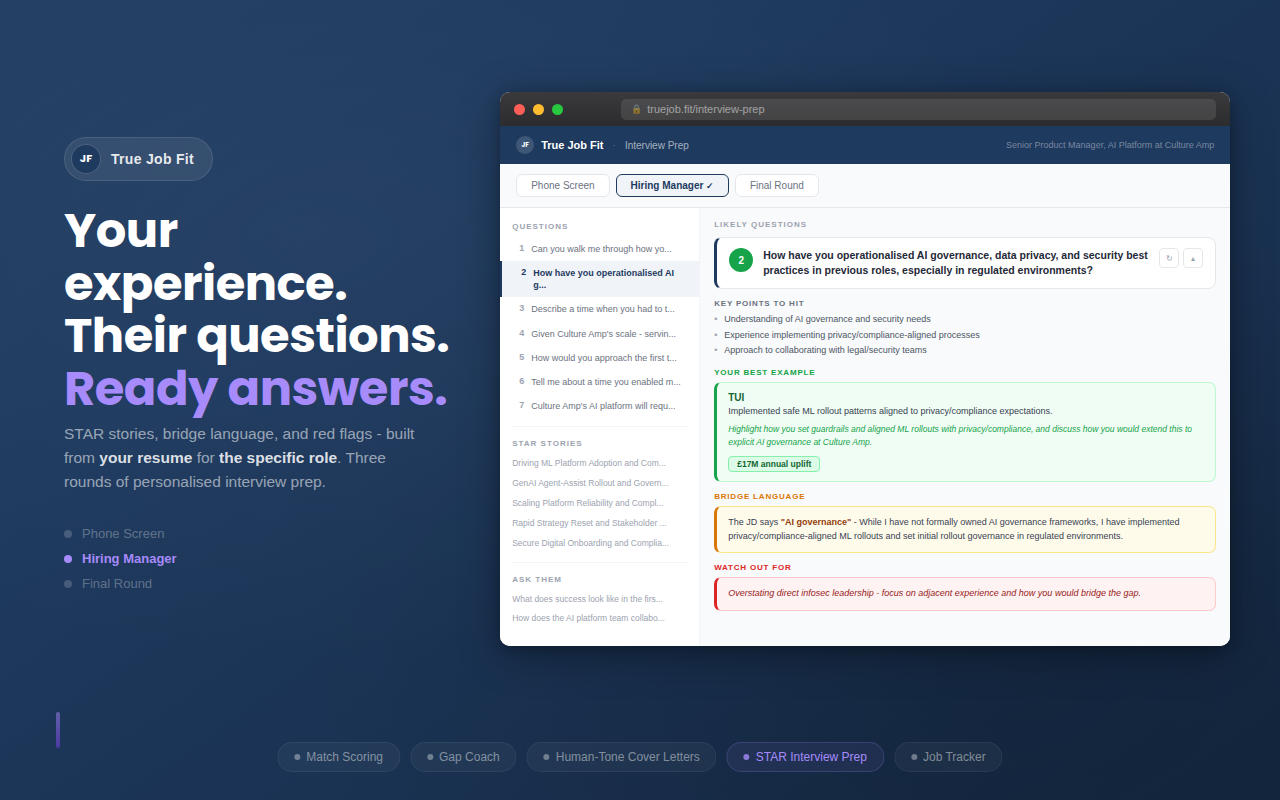
Phone Screen Hiring Manager Final Round
5-8 role-specific questions per round · Answer frameworks with your real examples · STAR stories bank mapped to likely questions · Questions to ask them · Regenerate any question for a fresh angle · Download as markdown to review on your phone before walking in
True Job Fit interview preparation
Dashboard

Track your entire pipeline

Every job you save builds your pipeline - Saved → Applied → Interviewing → Offered. See your score distribution, average match, response rates, and access all your cover letters and interview prep from one place.
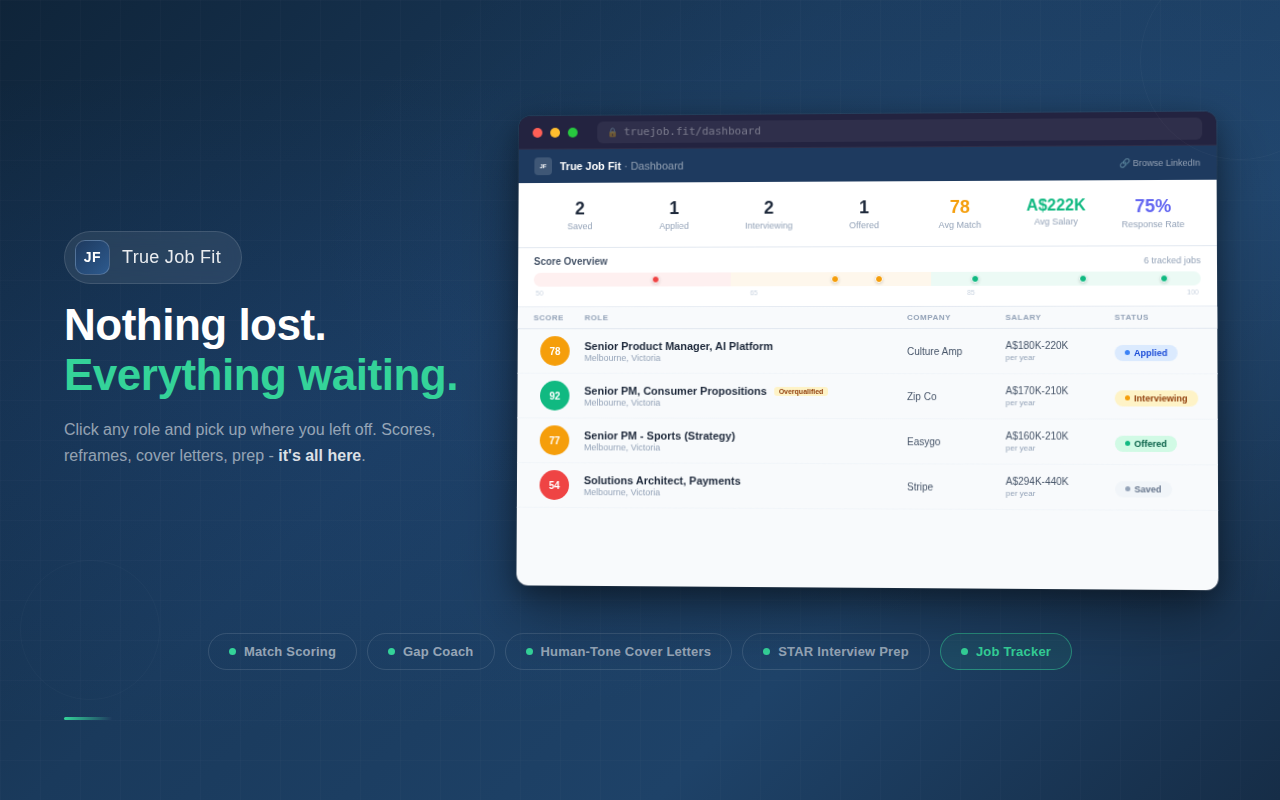
● 12 Saved ● 5 Applied ● 2 Interviewing ● 1 Offered
True Job Fit application dashboard with score map, pipeline tracking and salary data

Pay-as-you-go. No subscription.

~$4 / month
Typical active job seeker (20 scans + 5 cover letters + 2 full interview preps per week)
~$0.02
per job scan
~$0.05
scan + cover letter
~$0.15
full prep (scan + letter + 3 interview rounds)
You bring your own OpenAI API key. You pay OpenAI directly - we don't mark up, take a cut, or add fees. The extension itself is free.
Jobscan charges $49.95/month. Teal charges $29/month. Huntr charges $40/month.
True Job Fit: $3-5/month. No subscription. No markup.

Common questions

Is my resume data safe?
Your resume (or CV) is parsed locally in your browser and stored on your device. When you run an analysis, your resume text and the job description are sent directly to OpenAI using your own API key. No True Job Fit servers sit in between - we don't have servers. We never see your resume, your API key, or your job data. Compared to tools like Teal or Jobscan, which send your resume to their own servers first, True Job Fit eliminates the middleman entirely.
Do I need an OpenAI account?
Yes. You'll need an OpenAI API key, which takes about 2 minutes to set up at platform.openai.com. Add some credit ($5 is plenty for months of use), copy your key, paste it into True Job Fit. That's it.
How accurate are the match scores?
Scores use a classification-to-band system that distinguishes between direct experience, adjacent experience, and genuine gaps. It's calibrated against real recruiter feedback - not just keyword counting. Adjacent function matches are correctly penalised, and overqualification is detected and flagged.
What's the deal with ATS keyword filtering?
98% of Fortune 500 companies use Applicant Tracking Systems that filter applications before a recruiter sees them (source: Jobscan ATS Usage Report, 2025). These systems match on exact keywords from the job description - so if the JD says "cross-functional leadership" and your resume says "stakeholder management," you can get filtered out despite having the same experience. True Job Fit's Gap Coach identifies exactly where this is happening and gives you the specific phrases to fix it.
Do I need LinkedIn Premium?
No. True Job Fit works with any LinkedIn account - free or Premium. It reads the job description that's visible on the page and runs its own analysis.
How much does it actually cost to use?
Most active job seekers spend $3-5/month on OpenAI API costs. A quick job scan costs about 2 cents. A scan plus cover letter runs about 5 cents. A full preparation (scan, cover letter, and all three interview rounds) is about 15 cents. The extension itself is completely free - you just pay OpenAI directly for the AI processing.
How is this different from Teal, Jobscan, or LinkedIn Premium?
Those are all web apps - you leave LinkedIn, switch tabs, paste in a job description, wait for results, then switch back. True Job Fit works directly inside LinkedIn. The score, gap coaching, cover letter, and interview prep all appear on the job page itself. Zero context-switching. LinkedIn Premium now has "Show match details," but it's a basic keyword overview - no bridge language, no cover letters, no STAR stories, no application tracker. True Job Fit gives you the full workflow without leaving the page you're already on.
What AI model does it use?
GPT-4.1 - selected after benchmarking 8 models for accuracy, consistency, and cost. We tested newer and more expensive models but they didn't justify the price difference for this use case. Every prompt in the extension is specifically calibrated for GPT-4.1, which means scores are consistent and reliable across every job you analyse.
Will the cover letters sound like AI wrote them?
We've specifically tuned the prompts to avoid common AI tells - no em dashes, no semicolons, no generic filler. Shorter content is preferred over longer polished content. Four distinct styles ensure each letter has a different voice, not four versions of the same metrics-heavy template.
Are the interview questions actually personalised?
Completely. Every question is generated for the specific job you're preparing for. The answer frameworks reference your actual resume - your projects, your companies, your metrics. The STAR stories bank pulls from your real experience and maps each story to the questions it best answers. You can regenerate any single question for a fresh angle without losing the rest. And you can download the whole prep sheet as a markdown file to review on your phone before the interview.
Are the AI results always accurate?
No AI tool is perfect, and we don't pretend otherwise. Match scores, keyword classifications, and suggestions are generated by GPT-4.1 and can occasionally misclassify a keyword or pick a weak CV reference. We've built code-level checks that catch common errors automatically (like detecting when a keyword is already on your CV), but you should always review the output and use your own judgment. Think of it as a smart first draft, not a final answer. If something looks off, the ATS Keyword Check has a Re-analyse button to get a fresh result.
What does the ATS Keyword Check do?
It extracts the most important keywords from any job description, checks each one against your CV, and tells you exactly what to do. Keywords you already have are marked as found. Keywords where you have the experience but used different words get a specific action: swap a word in an existing bullet, weave a term into a specific sentence, or add it to your skills section. Keywords you genuinely don't have are flagged honestly so you can prepare for interview questions instead of faking it. No other tool distinguishes between "wrong words" and "real gaps."

Stop guessing. Start matching.

The only job matching tool that works directly inside LinkedIn - score, gap coach, ATS keywords, cover letters, interview prep, and tracking without ever leaving the page.

Add to Chrome - Free

Got feedback? We'd love to hear it →